Shopify's store search does not list Arabic, filters hide on phones, and most of the fix costs hours rather than apps: what to check first and what to pay for.
Lebanese online stores lose sales in the search box, and few owners ever look there. Baymard Institute found that 56% of e-commerce sites fail to support their users' search needs, and Shopify's own store search does not list Arabic among its 33 supported languages.
We build and repair e-commerce stores in Lebanon, and search is the part of a store that owners test least. A shopper who types a word and sees nothing rarely tries a second spelling. They close the tab. Or they message you on WhatsApp to ask whether you stock something that sits on your shelf page. This post covers why products go missing, what Shopify's free tools fix, what a paid app adds, and what the work costs.
Why can't shoppers find products on my online store?
Shoppers cannot find products because store search only matches the words in your product data, and shoppers use other words. Shopify's help center says search reads titles, descriptions, tags, vendor and product type, and forgives a typo of one letter or two swapped letters. A brand nickname, an Arabic word or a badly misspelt name often returns nothing.
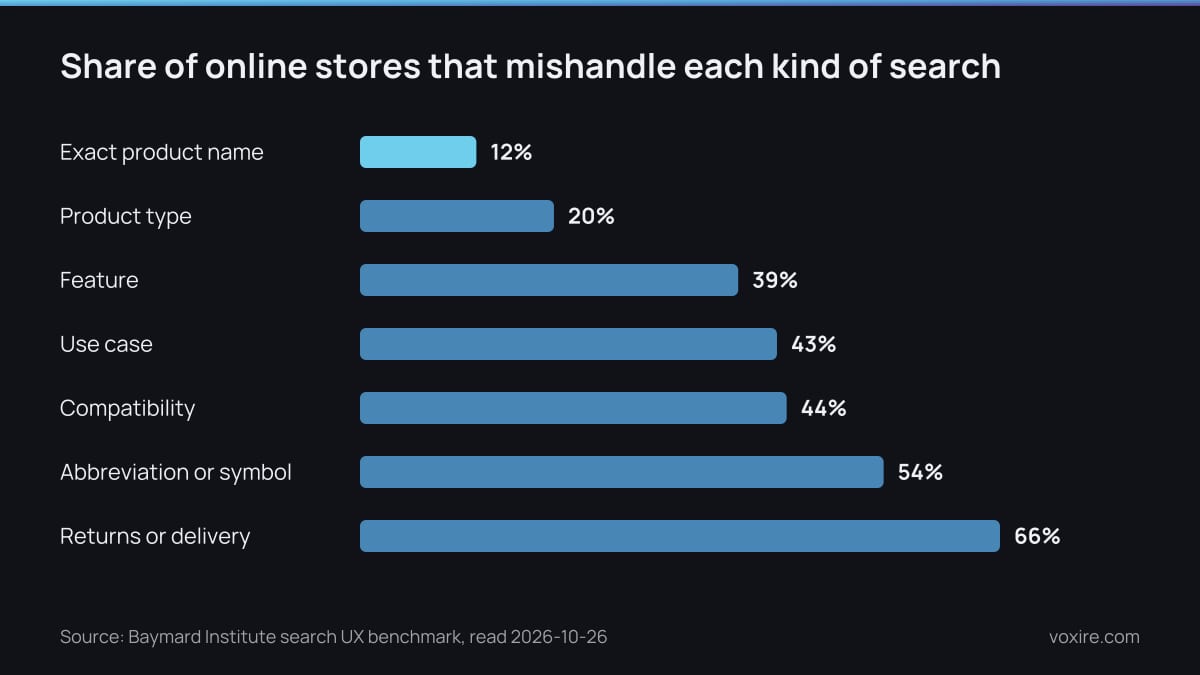
Share of sites with search issues by query type. Data from Baymard Institute, read 2026-10-26
The failures are not random. Baymard's benchmark finds only 12% of sites stumble on an exact product name, while 54% mishandle abbreviations and symbols. Exact names are the easy case. Everything a real customer types is harder.
Lebanese shoppers add a layer Baymard does not test. The same customer may type in English one day and in Arabic the next. Then there is Arabizi, Arabic written in Latin letters and numbers. A store that only understands English misses the rest.
Why are my products not showing up in Shopify?
Products go missing from Shopify search when the shopper's word is not in the title, description, tags, vendor or type, or when the product is unlisted. Shopify reads only the first 10,000 characters of a description, so a term buried at the bottom of a long description may never match.
Shopify's own troubleshooting list starts with three checks. Is a third-party app powering search instead of Shopify? Is the product set to Unlisted? Is the search made only of stopwords such as "the"? If all three pass, the problem is your data.
On one client's store this year, a search for "pencil" returned nothing although the shop stocked them. The word shoppers typed was not where Shopify looks for it. We put the product type into every title and added tags for the words customers actually used. The same job fixed a collection search that looked in the wrong place and a search that loaded far too much before showing anything.
None of that needed a new app. It needed someone to read the products the way a shopper reads them.
Does Shopify search work in Arabic?
Not officially: Arabic is missing from the 33 languages Shopify lists for online store search. Shopify's help center names Bulgarian through Vietnamese, including Hindi and Thai, but not Arabic. Plural matching and typo tolerance are promised only for listed languages, so an Arabic storefront cannot count on either.
The free fix is synonym groups in the Search & Discovery app. A synonym group holds up to 20 terms and a store can have 1,000 groups. One group can join perfume, parfum, عطر and 3atr, so all four return the same shelf. Build the groups from what customers type, not from what you guess.
Filters have a language catch too. Tag and vendor filter values only display in your store's default language. If your default is English, a shopper browsing in Arabic loses the tag filter and sees brand names in English. Metafield filters translate properly, so we move brand and type filters onto metafields for bilingual stores.
Why do filters stop working on a phone?
Filters stop working on a phone because most themes hide them in a drawer that was designed and tested on a laptop. Statcounter puts mobile at 47.16% of web traffic in Lebanon in September 2026, so close to half your visitors meet that drawer first. Overlapping buttons and filters that reset on page two are the usual faults.
The store with the missing pencils had all of them. Its search popup covered the results on a small screen. The brand filter mixed up values. Clearing a filter sent the shopper back to page one with half the selection still applied. Quick-add buttons sat on top of product names. We rebuilt the search overlay for phones and fixed how filters and pages talk to each other.
Shopify adds hard limits on top of theme bugs:
- Collections with more than 5,000 products show no filters at all, and a store can run at most 25 filters.
- A filter shows at most 100 values, so a long brand list gets cut.
- The price filter disappears for any currency other than your default one.
That last rule matters in Lebanon. If your store shows prices in dollars and lira, one of the two loses its price filter. Speed makes all of this worse, and our audit of Lebanese online stores found slow phone loading across the sample.
What is the best search app for Shopify?
For most Lebanese stores, the best search app is the free Shopify Search & Discovery app, set up properly. Pay for a third-party app when a collection passes 5,000 products or you need search that understands intent. Searchanise starts at $19 a month for up to 1,500 products on its Basic plan.
| Option | Monthly cost | Catalogue limit | Arabic and filters |
|---|---|---|---|
| Shopify built-in search | Included in your plan | None stated | Arabic not among the 33 supported languages |
| Search & Discovery app | Free | Filters hidden above 5,000 products per collection, 25 filters | Tag and vendor filters in default language only |
| Searchanise Free | $0 | Under 25 products | Ask for an Arabic and Arabizi demo |
| Searchanise Basic | $19 ($192 a year) | Up to 1,500 products | Ask for an Arabic and Arabizi demo |
| Searchanise Essential | $39 ($396 a year) | Up to 7,500 products | Ask for an Arabic and Arabizi demo |
Source: Shopify Help Center, search behavior, Shopify Help Center, filters, Searchanise on the Shopify App Store, read 2026-10-26
Want this priced for your business? Get a free quote.
The free app has a reputation problem worth knowing about. Its App Store listing shows a 2.6 rating from 510 reviews, with 21% at one star, and recent reviews complain that searches return hundreds of unrelated products. Treat that as a reason to test your own searches after setup, not as a reason to skip it.
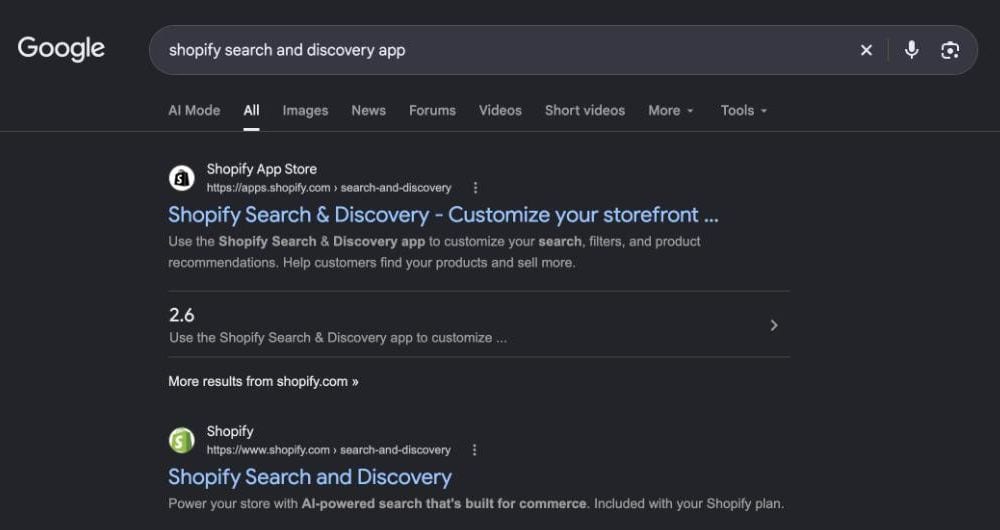
Google results for "shopify search and discovery app" searched from Lebanon, screenshot taken 2026-10-26
Older guides still point owners at Boost AI Search & Filter. Its listing now says the app is not currently available on the Shopify App Store. Check that an app is still listed before you build a store around it.
What does it cost to fix search on an existing store?
Fixing search on an existing Shopify store usually costs $0 in software, because the work sits in the product data and the theme. Shopify's Search & Discovery app is free. What you pay for is hours. Titles and tags get rewritten, synonym groups get built, and someone tests the filters on a real phone.
We price that work after reading your store's search report. A 200-product boutique and a 4,000-product electronics shop are different jobs. When the theme itself is the problem, a rebuild is the honest answer. A new store from us costs $5,000 to $12,000, the range shown on our web design service page.
If you are still choosing a platform, our guide to whether Shopify works for a store in Lebanon covers plans and payments. For the rest of the funnel, from product page to checkout, see our conversion rate optimization guide for Lebanese stores.
What should you actually do this week?
Open your search report, fix the worst searches that return nothing, and test your filters on your own phone. Shopify's Search & Discovery reports show top searches and searches with no results. None of these three jobs needs a developer or a paid app, and together they show whether you need one.
- In your Shopify admin, open the search reports and list every search with no results.
- For each one, decide: you do not stock it, or your words differ from the shopper's.
- Where the words differ, add a synonym group with the English, Arabic and Arabizi forms.
- Put the product type in every title. Keep the words shoppers use near the top of each description.
- On your phone, over mobile data, search three products, open the filters, pick a brand and go to page two.
Write down what breaks. That list is the brief for whoever fixes your theme.
Sources
- Baymard Institute, Ecommerce search query types benchmark, read 2026-10-26
- Shopify Help Center, Search behavior in your online store, read 2026-10-26
- Shopify Help Center, Adding filters with Shopify Search & Discovery, read 2026-10-26
- Shopify Help Center, Storefront search, read 2026-10-26
- Shopify App Store, Shopify Search & Discovery, read 2026-10-26
- Shopify App Store, Searchanise Search & Filter, read 2026-10-26
- Shopify App Store, Boost AI Search & Filter listing, read 2026-10-26
- Statcounter, Desktop vs Mobile vs Tablet market share in Lebanon, read 2026-10-26
- BOGOS, Shopify Search & Discovery app setup guide, read 2026-10-26
Want your store's search tested in English, Arabic and Arabizi?
Send us your store link and three things customers ask you for on WhatsApp. We will search for them on a phone over mobile data, list what goes missing, and quote the data and theme work together.
→ E-commerce Development → Get a Free Quote → Chat on WhatsApp
Enjoying this article?
Enter your email and get a clean, formatted PDF of this article: free, no spam.
Voxire
Web Development in Lebanon
Production web development for Lebanese businesses. Next.js and React builds, e-commerce, custom applications, bilingual Arabic and English from the first wireframe, USD pricing with fixed scope, and honest numbers on what a build costs here.
Learn more