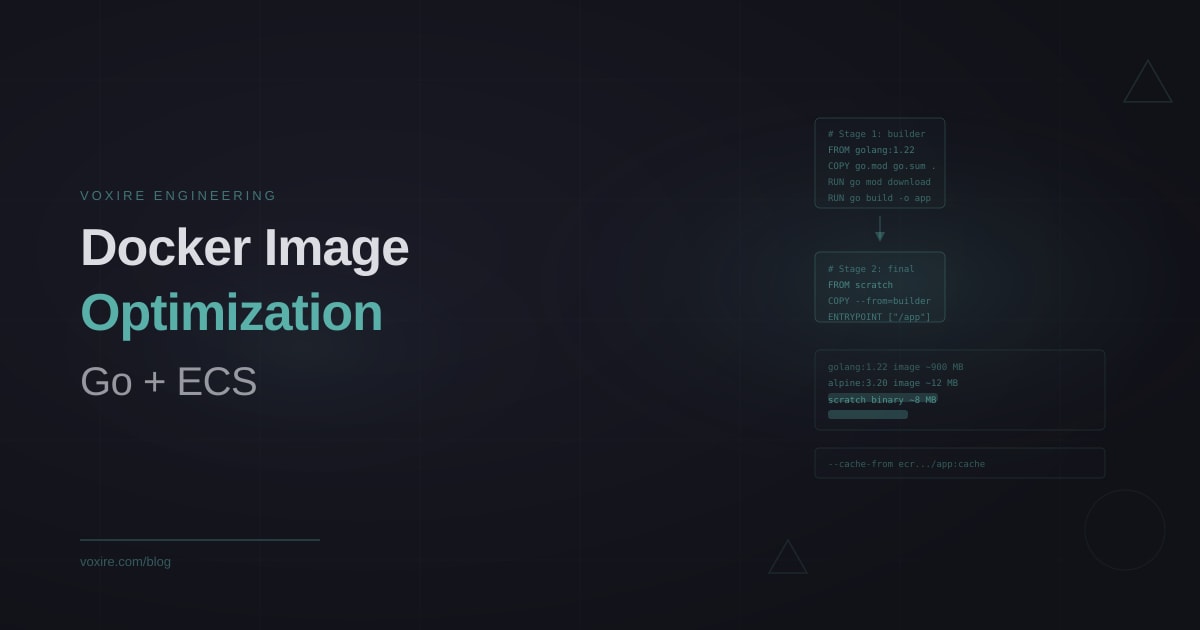
A naive Go Docker image built from the official golang base weighs close to 900 MB. The same binary in a scratch container is under 10 MB. That gap matters in AWS ECS: smaller images push faster to ECR, pull faster onto Fargate tasks, and shrink your attack surface. Here is how we build Go containers for production.
A naive Go Docker image built from the official golang base weighs close to 900 MB. The same binary in a scratch container is under 10 MB. That gap matters in AWS ECS: smaller images push faster to ECR, pull faster onto Fargate tasks, and reduce your attack surface. This post covers how we structure Go Dockerfiles for the services we deploy on ECS in Lebanon and across MENA.
Why image size matters more than most teams think
When an ECS task starts, Fargate pulls the container image from ECR onto the host node. If the image is large, this pull adds seconds or tens of seconds to your cold start time. For services with auto-scaling enabled, that delay compounds: a traffic spike triggers a scale-out event, but new tasks are slow to become healthy because they are waiting on a large image pull.
Small images also reduce the blast radius of a compromised container. A scratch image contains only your compiled binary and the specific CA certificates you copied in. There is no shell, no package manager, no libc. An attacker who gains code execution inside the container has almost nothing to work with.
On ECR costs, image storage is charged per GB per month. For teams running many services with multiple tags, the difference between 900 MB and 10 MB per image adds up over time.
The multi-stage Dockerfile pattern
The standard approach uses two stages: a builder stage that compiles the Go binary, and a minimal final stage that contains only what the binary needs to run.
# Stage 1: compile
FROM golang:1.22-alpine AS builder

WORKDIR /build

# Copy dependency files first to maximize layer cache hits
COPY go.mod go.sum ./
RUN go mod download

# Copy source and build
COPY . .
RUN CGO_ENABLED=0 GOOS=linux GOARCH=amd64 go build \
    -ldflags="-s -w" \
    -o app \
    ./cmd/server

# Stage 2: final image
FROM scratch

# Copy CA certificates for HTTPS calls to external APIs
COPY --from=builder /etc/ssl/certs/ca-certificates.crt /etc/ssl/certs/

# Copy the compiled binary
COPY --from=builder /build/app /app

# Run as non-root
USER 65534:65534

EXPOSE 8080
ENTRYPOINT ["/app"]
The CGO_ENABLED=0 flag produces a statically linked binary that does not depend on the host's C library. Without this, the binary tries to load libc from the runtime environment, which does not exist in a scratch image. The -ldflags="-s -w" strip the symbol table and DWARF debug info, reducing binary size by 20 to 30 percent with no runtime impact.
Understanding layer caching in Go builds
The order of COPY instructions determines how effectively Docker caches layers. The key principle: copy files that change infrequently before files that change often.
Go module files (go.mod and go.sum) change only when you add or update dependencies, which happens rarely compared to source changes. By copying them first and running go mod download in a separate layer, Docker caches the entire module download step. Subsequent builds where only source code changed skip the download entirely.
What breaks layer caching without people noticing:
# Common mistake that kills layer caching
COPY . .
RUN go mod download
RUN go build ...
Here, any source file change invalidates the COPY . . layer, which means go mod download re-runs on every build even though dependencies have not changed. With 200+ dependencies, that can add 30-60 seconds per build.
Scratch vs distroless vs Alpine: what we use
Three common choices for the final stage:
scratch: The minimal option. Zero OS packages, zero shell. The binary is the only thing that runs. Our first choice for Go services that only make outbound HTTP calls and need CA certificates.
gcr.io/distroless/static-debian12: A Google-maintained base with no shell but a minimal Debian file system including tzdata and CA certs. Useful when your binary needs timezone data or has other libc dependencies you cannot easily avoid.
alpine:3.x: The heaviest of the three at roughly 7 MB, but useful when you need a shell for debugging or when running a binary that dynamically links against musl. We sometimes use Alpine during a debugging phase and switch to scratch before the service goes to production.
For our RTYLR platform services, we use scratch for pure HTTP services and distroless for services that need timezone handling in date calculations.
ECR layer cache for CI builds
DockerHub and GitHub-hosted CI runners do not persist Docker layer cache between runs. Every build starts cold, which means the module download runs every time.
With ECR, you can use the registry as a cache source:
# In your GitHub Actions workflow
- name: Build and push
  uses: docker/build-push-action@v5
  with:
    context: .
    push: true
    tags: ${{ env.ECR_REGISTRY }}/myservice:${{ env.IMAGE_TAG }}
    cache-from: type=registry,ref=${{ env.ECR_REGISTRY }}/myservice:cache
    cache-to: type=registry,ref=${{ env.ECR_REGISTRY }}/myservice:cache,mode=max
The cache-to line writes the layer cache to ECR as a separate manifest. The cache-from line restores it on the next build. This cuts build times from 3-4 minutes to under 60 seconds for most Go services, because the module download layer is already cached.
Timezone data and the time zone problem
A common issue when migrating to scratch: the Go standard library reads timezone data from the OS filesystem at runtime. On a scratch image, there is no filesystem beyond what you explicitly copy in.
If your service does any timezone conversion (formatting timestamps in a user's local time, calculating business hours in Beirut vs Dubai), you need to handle this. Two options:
Option 1: Use the embedded timezone database that ships with Go 1.15+:
import _ "time/tzdata"
This embeds the entire timezone database into the binary, adding about 450 KB. For most services, this is the cleanest solution.
Option 2: Copy the timezone data from the builder stage:
COPY --from=builder /usr/share/zoneinfo /usr/share/zoneinfo
We use the time/tzdata import approach because it requires no Dockerfile changes when the service is restructured.
Running as non-root
ECS task definitions can enforce non-root execution at the task level, but doing it in the Dockerfile is cleaner. The scratch image has no /etc/passwd or /etc/group, so you cannot reference named users. Use numeric UIDs instead:
USER 65534:65534
65534 is the conventional nobody UID. If your service writes to disk (temp files, local cache), create the directory and set ownership during the build stage, then copy it into the final image with the correct ownership.
Health check configuration
ECS relies on ALB health checks to determine task readiness. The health check endpoint should be fast and lightweight, but it must actually verify the service is ready to handle requests.
For the Dockerfile health check (used by local Docker, not by ECS):
HEALTHCHECK --interval=10s --timeout=3s --start-period=5s --retries=3 \
    CMD ["/app", "-healthcheck"]
Or, since scratch has no shell or curl, build a minimal health check mode into the binary itself that exits 0 when the service is healthy.
Key lessons from production
- Always use multi-stage builds. Never ship a Go binary in a golang base image.
- Copy
go.modandgo.sumbefore source files to maximize layer cache hits. - Use
CGO_ENABLED=0and-ldflags="-s -w"for static, stripped binaries. - Scratch is the right choice for most pure HTTP Go services.
- Use ECR as a cache source in CI to cut build times significantly.
- Handle timezone data with
import _ "time/tzdata"rather than OS file dependencies. - Use numeric UIDs in scratch images for non-root execution.
- ECS cold start times depend directly on image size, especially for auto-scaled services.
Enjoying this article?
Enter your email and get a clean, formatted PDF of this article: free, no spam.
Not sure where to start?
We help engineering teams in Lebanon and across MENA build production-ready backend infrastructure on AWS. If you are building SaaS products and want to get the deployment architecture right from the start, reach out at https://voxire.com/get-a-quote/
Voxire
SaaS Products
Building and running SaaS: Go and PostgreSQL, distributed systems, multi-tenancy, billing, observability, and the production engineering behind RTYLR. Written from shipping our own product, not from reading about it.
Learn more